F-Droid: “F-Droid is the app distribution ecosystem for Android where your user freedom comes first. Discover our app store, explore the world of free and open source (FOSS) apps and learn about our app distribution tools.”
Obtanium: “Obtainium allows you to install and update apps directly from their release pages, and receive notifications when new releases are made available.”
Galaxy Store: I didn’t expect the Samsung Store to be in the list, but okay.
Auto-reply when driving: When my phone connects to my car’s Bluetooth, Tasker automatically replies to incoming messages with a canned “I’m driving and can’t respond right now” text. It stops the moment I disconnect.
Low battery text to my partner: When my battery drops to 10%, Tasker sends an automatic SMS to a specific contact so they know my phone is about to die. No more “why didn’t you reply” conversations.
Car parking notification: The moment I disconnect from my car’s Bluetooth, Tasker logs my GPS coordinates, timestamps the location, and sends me a notification. I can add a note or even take a photo of the parking spot from there.
Sort my Downloads folder: Every time a new file lands in my Downloads folder, Tasker moves it into the right subfolder, whether that’s images, documents, APKs, or audio files. My Downloads folder used to be a mess.
Flashlight brightness slider: On Android 13 and above, Tasker exposes the hidden flashlight intensity control as a floating slider whenever I toggle the torch on. I had no idea this was even possible.
Important notifications on Always-On Display: I keep my AOD off to save battery, but Tasker turns it on whenever I get a notification from specific apps, like WhatsApp or Gmail. It switches back off after I dismiss the notification.
Google Doorbell chime: Instead of relying on a silent notification when someone rings my Nest doorbell, Tasker intercepts the notification and plays a custom chime on my phone while opening the Google Home live feed automatically.
Title is kind of click-bait-y… but Termux definitely is useful & i have it running on my Android devices.
Termux: “Termux is an Android terminal emulator and Linux environment app that works directly with no rooting or setup required. A minimal base system is installed automatically - additional packages are available using the APT package manager.”
Seal: GitHub: JunkFood02 / Seal: “🦭 Video/Audio Downloader for Android, based on yt-dlp”
Bitwarden: “Credential security for humans, agents, and machines. Bitwarden secures every password, passkey, and secret that your people, AI agents, and machines rely on. Experience the open source, end-to-end encrypted platform that scales with you.”
Image Toolbox: “Edit, create & convert images with powerful AI — your all-in-one studio”
Proton VPN: The Intercept: Proton Mail Says It’s “Politically Neutral” While Praising Republican Party: “… Proton CEO Andy Yen praised the Republican Party in a post on X, declaring that “10 years ago, Republicans were the party of big business and Dems stood for the little guys, but today the tables have completely turned.” When the tweet went viral, Proton’s official Reddit account posted a now-deleted comment stating that “Until corporate Dems are thrown out, the reality is that Republicans remain more likely to tackle Big Tech abuses.””: So, no thank you to anything Proton =] I cancelled my account after that, moving first to Tuta, then to Mailbox.org.
Wavelet: GitHub: Pittvandewitt / Wavelet: “A quick rundown on each feature and its settings”
F-Droid: “F-Droid is the app distribution ecosystem for Android where your user freedom comes first. Discover our app store, explore the world of free and open source (FOSS) apps and learn about our app distribution tools.”
Web Site: HeyPolo: “Always know yourfamily is safe. Everything you need to keep your family connected and safe, without the surveillance.”
I don’t currently have a need for this (especially with Apple products + FindMy), but i was interested just because it’s supposed to be privacy-focused.
I think the issue they are flagging in the article is just the number of devices that come back without names \ Generic information instead of being more accurate date.
In the past I’ve used NetAlertx & really did like it, but recently when I’ve tried to use it, I’ve had problems. Occassionally i go back to test it out again, but haven’t gotten in working.
In the meantime, I’ve just setup OOTT that doesn’t have nearly the same features \ details as NetAlertx, but it works, so that’s good enough for me =] Seems a bit better (for me) than WatchYourLAN, so will be seeing how development goes.
GitHub: exiftool / exiftool: “ExifTool meta information reader/writer”
Web Site: ExifTool by Phil Harvey: “ExifTool is a platform-independent Perl library plus a command-line application for reading, writing and editing meta information in a wide variety of files.”
The command used by Irene Okpanachi: perl ~/exiftool-13.55/exiftool -all= -overwrite_original filename.jpg — strips metadata from the file permanently and overwrites it without creating a backup copy. Replace filename.jpg with the file name.
“A newly discovered AirDrop vulnerability means someone sitting in the same café as you can silently break AirDrop on your iPhone or Mac, no tap or pairing required. They just send a stream of junk data to your iPhone and AirDrop — alongside AirPlay, Handoff, Universal Clipboard, and Continuity Camera — all go dark for as long as they keep it up.”
Gemma: “Our most advanced open models help developers create AI applications that run wherever users need them — from cloud servers to laptops and even phones.”
Ollama: “The easiest way to build with open models”
“Rather than using a standard LLM, I used a small embedding model, nomic-embed-text, running in Ollama. This model converts book descriptions into numerical vectors so the system can compare these vectors rather than vague descriptions.”
I saved this because someone had mentioned the DOCX editing part being removed from other repos? So i wanted to save it in case it was useful for the future.
Patrick: “Reads, edits and reasons your Word files on the cloudyour own computer — tracked changes you approve.”
GitHub: superdoc-dev / superdoc: “🦋️ SuperDoc - Modern DOCX Editor and Agent SDK”
SuperDoc: “Modern DOCX Editor and Agent SDK. Add DOCX superpowers into your product and agentic workflows”
Get A Life (1990): “A 30-something guy still lives with his parents, works as a paperboy, and tries to avoid growing up and being responsible at all costs.”
The Critic (1994): “Jay Sherman is a New York film critic who has to review films he doesn’t like for a living.”
Malcolm & Eddie (1996): “Apparently, opposites do attract. Malcolm and Eddie are as different as one can imagine, but they’re best friends who manage to be roommates as well as co-workers without killing each other.”
Dharma & Greg (1997): “A free-spirited yoga instructor finds true love in a conservative lawyer and they get married on the first date. Though they are polar opposites, he fulfills her need of stability and she fulfills his need of optimism.”
Smart Guy (1997): “A 10-year-old genius goes from elementary school to high school.”
Damon (1998): “The adventures of Damon, a talented police officer living in Chicago with his loser older brother.”
Spaced (1999): “Friends Tim and Daisy, 20-something North Londoners with uncertain futures, must pretend to be a couple to live in the only apartment they can afford.”
Two Guys and a Girl (1998): “Three twenty-somethings share a Boston apartment and hang around (and work) at a pizza place.”
Backrooms (2026): “After a therapist’s patient disappears into a dimension beyond reality, she must venture into the unknown to save him.”
Hazbin Hotel (2019): “In an attempt to find a non-violent alternative for reducing Hell’s overpopulation, the daughter of Lucifer opens a rehabilitation hotel that offers a group of misfit demons a chance at redemption.”
The Amazing Digital Circus (2023): “A woman finds herself trapped in a virtual circus where she and five others are subject to the whims of a wacky artificial intelligence. In this digital purgatory they must face frightening N.P.C.s and cope with their own personal traumas.”
Critical Role: The Legend of Vox Machina (2022): “After saving the realm from evil and destruction at the hands of the most terrifying power couple in Exandria, Vox Machina is faced with saving the world once again-this time, from a sinister group of dragons known as the Chroma Conclave.”
RWBY (2012): “Four teenage girls form Team RWBY and train to fight crime and monsters known as the Grimm, while the world of Remnant remains on the brink of an all-out war.”
The Exquisite Torment of Loving Your Enemy by Brigitte Knightley: goodreads: The Exquisite Torment of Loving Your Enemy (Dearly Beloathed #2): “Osric is a member of the Fyren Order, a guild of assassins who gleefully murder for money. Aurienne is a Haelan, a scholar-healer whose Order’s motto is Harm to none. Clear-cut absolutes separate them: good and bad, right and wrong, light and dark . . .”
Fabulous Bodies by Chuck Tingle: goodreads: Fabulous Bodies: “Fashion influencer by day and grave-robber by night, Poppy Stringer is on call when Eddie Michaels—a flamboyant, piano-slamming rockstar and queer icon—unexpectedly dies. All Poppy has to do is retrieve Eddie’s body from the medical examiner’s office, but what starts as a routine delivery quickly goes off course when Eddie wakes up.”
Cross My Heart, I Hope You Die by Mallory Arnold: goodreads: Cross My Heart, I Hope You Die: “When Nora, Ruby, and Cham discover that they’ve each been dating the same man, what starts as outrage quickly spirals into a plot for revenge. Together they hatch a plan to lure their boyfriend to a romantic getaway in a secluded cabin at the top of a snow-covered mountain.”
The Dragon Has Some Complaints by John Wiswell: goodreads: The Dragon Has Some Complaints: “Garrodigh was once a four-headed dragon, among the most powerful in Kardoša. After an unfortunate incident, he now has three heads, one stump, and a daily whirlwind of internal bickering. Centerhead wants to rain death upon all humanity, Bottomhead is like a feral cat, and Upperhead is under the delicate delusion that he is, in fact, human.”
Not With a Bang by Temi Oh: goodreads: Not with a Bang: “In the summer sky, a celestial object is fast approaching, due to slingshot around the Earth and disappear again. And everyone has their own theory on what it is – a meteor, a planet, aliens?”
Carry Me to My Grave by Christopher Golden: goodreads: Carry Me to My Grave: “Maggie Wise will take your eyes. When Malcolm was growing up, the local kids made up that chant about his mother, claiming she was a witch. He and his siblings did their best to ignore it. Now, Maggie is dying, and those same siblings have left Malcolm and his sister-in-law Violet to hold a vigil at her bedside.”
Mudlark by Mary Helen Specht: goodreads: Mudlark: A Novel: “Jenny Sweet’s marriage is ending—and with it her band and maybe even her fragile relationship with her thirteen-year-old daughter, Neko. A reluctant wife and mother, Jenny plans a new journey of self-discovery after one more gig at Burning Man. But when Neko disappears amid the chaos of the festival, Jenny fears that everything that mattered to her has been lost. As she races against the dark, Jenny finds herself thrown into the past, and into the heart of a gathering storm.”
Null Entity by Seth Haddon: goodreads: Null Entity (The Volatile Memory Duology #2): “With her identity erased from the Corporate Federation, Wylla is a ghost in the untraceable, unpredictable, and fueled by vengeance. She fights alongside Sable, the AI consciousness whose murder they avenged, the one she loves in ways no system could ever define. Together, they’ve built a reputation for tearing through VisorForge’s carefully constructed lies.”
The Felicity Complex by August Clarke: goodreads: The Felicity Complex: " Welcome to the Felicity Complex! Constructed during the height of the Cold War, our unique hotel is prepared to protect you, the billionaire class, from nuclear annihilation! Shielded from radiation and supplemented with closed air systems and hydroponic gardens, this resort bunker offers a prime existence full gymnasium and spa, gourmet meals, top-tier medical care, and the best in entertainment."
Sea of Charms by Sarah Beth Durst: goodreads: Sea of Charms (Spellshop #3): “Marin is a supply runner with her own boat that she sails from island to island, delivering whatever anyone will pay her to deliver: letters, flour, even the occasional enchanted lemur. It’s a lonely life, but it’s hers, and she wouldn’t trade the freedom of the sea for anything. Her only companion is a sea serpent, Perri, whom she saved from a fisherfolk’s net.”
“ShadNet is going to offer shadPS4 users a way to connect, and play online games together. This project has been in the works for a few months now, but its in a stage where we can announce it officially,” the announcement on the ShadPS4 official website reads. “ShadNet is still in development, and there is still a lot to be done, but its ready for testing. At this moment, only tracking score works, but please feel free to give it a try!”
I never knew what the souvenirs did in Pokémon GO, so i finally was looking into it… looks like it’s really not that much (at least as of 3 years ago, when this post is from)
A huge and thriving community
03.14: A Raspberry Pi can still do a job
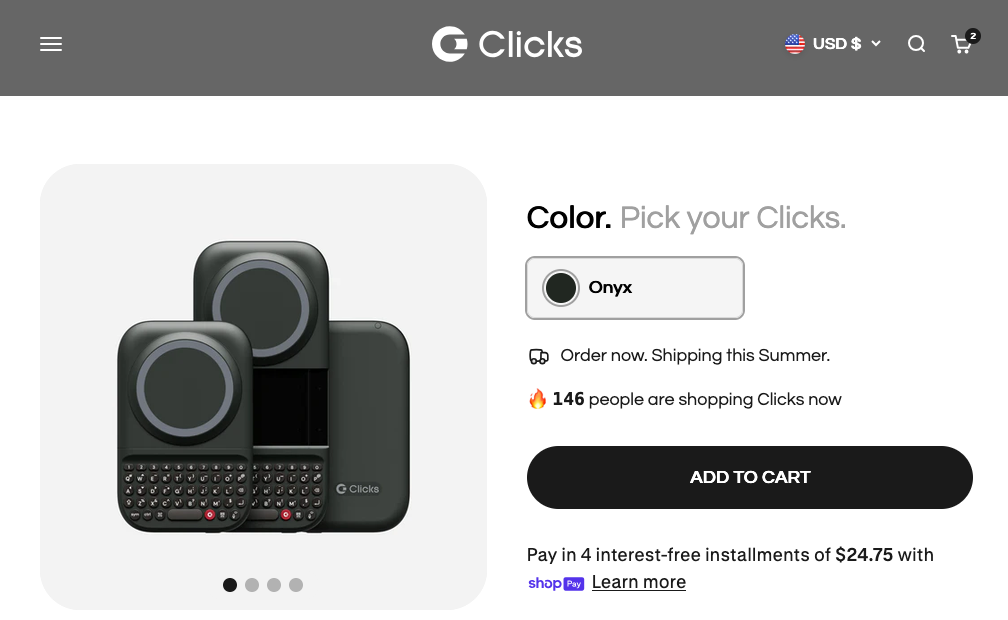
Clicks.tech: Clicks Power Keyboard: Mine should be getting delivered this week, so I’m looking forward to playing with that over the full case that it used to be for the keyboard.
pine65: PineVoice: “The PineVoice is a RISC-V based smart speaker based on the Bouffalo Lab BL606P RISC-V SoC with C906 64-bit and E907 32-bit CPU cores supported by 32 MiB of embedded pSRAM memory, 16 MiB of Flash, and with built-in Wi-Fi and Bluetooth radio interfaces. Some of notable features include dual microphone array and full local wake word detection. Factory shipped firmware is open-source and provides Wyoming Satellite, compatible with assistence platforms such as Home Assistant.”
A friend was talking to me about the Supernote Nomad, so i just started looking into it a bit.
This appears to run Android, so others have gotten KOReader running on it, which is what i’ve been trying to get on all my devices to have a consistent reading app, but also to be able to sync read details across different devices.
“Findings: From an initial cohort of 708 020 mother-child pairs in Hong Kong (approximately 43.3% with prenatal paracetamol exposure), a sibling-matched cohort was constructed of 124 333 children who were assessed for ASD and 97 285 for ADHD. Prenatal paracetamol exposure was not associated with an increased risk of either ASD or ADHD and these findings were consistent across paracetamol exposure timing, pattern, and dose.”
“Meaning: These findings provide important reassurance regarding the safety of indicated paracetamol use during pregnancy.”
Lightwhale: " Minimal, container‑first, optimized for reliability and happiness. Lightwhale makes Linux servers fun again. No maintenance headaches. Just boot and focus on what matters!"
I thought this was going to be something like NixOS or even just how Komodo can save your servers, stacks, etc.
Moonfin: “Moonfin is a modern, open-source client for Jellyfin and Emby - phone, tablet, desktop, Android TV, Apple TV, Smart TV and Roku - with native per-platform playback, offline downloads, multi-server libraries and theming that stock clients simply don’t have.”
Wholphin: GitHub: damontecres / Wholphin: “An OSS Android TV client for Jellyfin”
Fladder: GitHub: DonutWare / Fladder: “Fladder - A cross-platform Jellyfin Frontend built on top of Flutter.”
Streamyfin: “A modern Jellyfin client with support for downloads, Live TV, skip intro & credits, trickplay image and more!”
Infuse: “Infuse features a native integrations for Plex, Emby, and Jellyfin that allows you to use Infuse to access and play videos which are stored in these servers.”
Furbo in HomeAssistant
We have 2 Furbo’s that i am looking into getting running with HomeAssistant. I already have other outdoor cameras (Reolink), & even my Ring doorbell working through there, so i was hoping to get the Furbo’s in there too. There doesn’t seem to be a 1-click solution, so i started saving some information to dig more into it.
calibre: “calibre is a powerful and easy to use e-book manager. Users say it’s outstanding and a must-have. It’ll allow you to do nearly everything and it takes things a step beyond normal e-book software. It’s also completely free and open source and great for both casual users and computer experts.”
Connected Disks as NAS: GitHub: gregorwolf1973 / EasyNas-HASSIO-Addon: “Turns your Home Assistant server into a full-featured network storage (NAS) with Samba shares and a web interface.”
“Scrape and track data from any web page”: GitHub: danieldotnl / ha-multiscrape: “Home Assistant custom component for scraping (html, xml or json) multiple values (from a single HTTP request) with a separate sensor/attribute for each value. Support for (login) form-submit functionality.”
Traffic Cameras & Weather Radars: “The vast majority of traffic cameras use still images that update relatively infrequently, and the same is true of weather radars. You can use this to your advantage with the Generic Camera integration by supplying a link to the still image (usually a JPEG) as the source.”
GitHube: vingerha / gtfs2: “Support GTFS in Home Assistant GUI-only”
Chore-Tracker: GitHub: ad-ha / kidschores-ha: “KidsChores Custom Integration for Home Assistant”
So KidsChores is archived, but it’s now replaced by ChoreOps: “☑️ ChoreOps - A sophisticated household task and routine manager for Home Assistant. Gamify your chores for motivation, or just ensure the trash gets taken out on time”
I’m trying to read through this to see what they mean by “sidecars”; if it means just running multiple containers in the same docker-compose \ using a stack?
“The debugging process revealed that sidecar containers, despite their conceptual independence, interact through multiple hidden channels that complicate diagnosis considerably. The shared network namespace meant that port conflicts could arise unexpectedly when sidecars attempted to bind to ports that the primary container or other sidecars had already claimed, yet the error messages from Docker provided little indication of which container was responsible for which binding.”
^^^ This really makes it sound like they’re just talking about stacks… which is not that hard to see which container is using a specific port. If you have the docker-compose in front of you, it’s right there…
“Every sidecar adds a relationship, and relationships are where homelab bugs love to hide. A simple stack can survive a lot of rough edges because the path from cause to failure is still easy to follow. Once every file, port, route, and startup step passes through some small helper container, you have not made the system cleaner. You have moved the mess into places with worse names and shorter logs. These days, before I add one more container to “just handle” something, I ask whether in the future I will be able to debug it while tired. If the answer feels doubtful, the cleaner design is usually the boring one.”
Yeah, this really sounds like something I’m either not understanding, or not agreeing with. If there are “related” containers (i.e.: When i was running Plex, i had Tautilli in the same stack, or with Calibre & i would run calibre-web in the same stack), short of needing to maybe adjust a port, i never really have significant issues
GitHub: kopia / kopia: “Cross-platform backup tool for Windows, macOS & Linux with fast, incremental backups, client-side end-to-end encryption, compression and data deduplication. CLI and GUI included.”
Web Site: Kopia: “Fast and Secure Open-Source Backup Software. Encrypted, Compressed, and Deduplicated Backups Using the Cloud Storage You Pick.”
Organic Maps: “Organic Maps is a privacy-focused offline maps & GPS app for hiking, cycling, biking, and driving. Absolutely free. No ads. No tracking. Developed with love by the open-source community and the same people, who created MapsWithMe/Maps.Me app. Powered by OpenStreetMap data.”
GitHub: jumpserver / jumpserver: “JumpServer is an open-source Privileged Access Management (PAM) platform that provides DevOps and IT teams with on-demand and secure access to SSH, RDP, Kubernetes, Database and RemoteApp endpoints through a web browser.”
I haven’t read through it yet, but really interested in it because of what Palantir is & does…
GitHub: meltedinhex / analyst-ai-pack: “An open agent-skills library for malware analysis, reverse engineering, and threat hunting - 118 curated, runnable skills mapped to MITRE ATT&CK, D3FEND, and CAR.”
Web Site: Melted in Hex: Profile: “Malware analyst, reverse engineer, threat hunter, and AI security researcher — melting threats down to their raw bytes. The same instinct that took malware apart, now pointed at an AI-driven attack surface, with AI in the loop.”
Chained commands and bash scripting: “Bash scripting takes this a step further. Instead of typing that same chained command every time you want to update your system, you can save it as a bash script—a simple text file containing a sequence of commands—and schedule it to run automatically at specific times. This way you system just updates on autopilot without you having to worry about it.”
Dotfiles: “A dotfile is essentially any file on Linux whose name starts with a dot (.). By default, these files are hidden in graphical file managers because they’re not something you interact with during normal day-to-day use. They usually store configuration settings for your applications. For example, if you use the Bash shell, much of its behavior is defined in a config file called .bashrc—which is a dotfile. Likewise, if you use Vim, its configuration is stored in .vimrc, another dotfile.”
App window management: I have been meaning to try out a tiling window manager, but haven’t gotten to it yet.
Kubuntu: “Kubuntu is an operating system that combines the power of Ubuntu together with the elegant KDE Plasma desktop. It is ready to use right away, with all the tools you need to work, create and play.”
Kubuntu \ KDE isn’t my cup of tea, but that’s what’s ncie about Linux in general or just different Ubuntu flavors, you do have a choice of which one you want to run.
GitHub: rofl0r / ncdu: “inofficial fork of “NCurses Disk Usage””
NCurses Disk Usage: “Ncdu is a disk usage analyzer with a text-mode user interface. It is designed to find space hogs on a remote server where you don’t have an entire graphical setup available, but it is a useful tool even on regular desktop systems. Ncdu aims to be fast, simple, easy to use, and should be able to run on any POSIX-like system.”
Make Use Of: I tuned my GPU on Linux with an app that does what Windows won’t: “Still, nothing beats the ease of a GUI app, and this is where something like LACT comes into play. It’s a very comprehensive Linux application that lets you tweak your GPU, and it works well with the trifecta of AMD, Nvidia, and Intel.”
GitHub: ilya-zlobintsev / LACT: “Linux GPU Configuration And Monitoring Tool”
run0: Linux Audit: Run0: introduction and usage: “Run0 was introduced in systemd version 256 and is intended as an alternative to sudo. Both commands elevate privileges, but are also somewhat different. Author Lennart Poettering describes run0 as somewhat more similar to the ssh command than it is to sudo.”
Déjà Dup: Gnome: Déjà Dup Backups: “Déjà Dup is a simple backup tool. It hides the complexity of backing up the Right Way (encrypted, off-site, and regular) and uses Restic behind the scenes.”
MSP360 Free Backup: “Powerful freeware cloud backup software for personal use on Windows, macOS, and Linux.”
Kopia: “Fast and Secure Open-Source Backup Software. Encrypted, Compressed, and Deduplicated Backups Using the Cloud Storage You Pick.”
BorgBackup: “Deduplicating archiver with compression and encryption”
restic: “Restic is a modern backup program that can back up your files: from Linux, BSD, Mac and Windows, to many different storage types, including self-hosted and online services, easily, being a single executable that you can run without a server or complex setup, effectively, only transferring the parts that actually changed in the files you back up, securely, by careful use of cryptography in every part of the process, verifiably, enabling you to make sure that your files can be restored when needed, & freely - restic is entirely free to use and completely open source”
UrBackup: “UrBackup is an easy to setup Open Source client/server backup system, that through a combination of image and file backups accomplishes both data safety and a fast restoration time.”
I took my Surface Go out for the first time in years, just to play around with, get a different distro on, & just actually start using it. Unfortunately, i’m stuck on the existing Xubuntu 24.04 that i last installed on there, & cannot for the life of me, get the device to boot off of USB. I’ve tried different USB drives, efibootmgr, hubs, different adapters… nothing will get it to boot to USB.
GitHub: Division-36 / Z-Jail: “A lightweight, multi-layer Linux sandbox combining namespaces, pivot_root, seccomp-bpf, capability dropping, and an evidence-based verdict engine (Truthimatics Public Version) for secure, auditable code execution.”
“Multi-layer sandbox for native code execution on Linux. Seven independent defence layers — no external dependencies, ~130 KiB PIE binary. "
I really only saved this because I haven’t seen much about Bluesky \ Eurosky \ ATProtocol recently (or outside of just Bluesky.com)
“What is Eurosky? Eurosky is a European provider of PDS hosting that is committed to transparency, privacy and digital sovereignty. Instead of storing data in the US, Eurosky offers an alternative that operates within European legislation and values. Think of stricter privacy protection, less commercial exploitation of user data and a clear focus on public infrastructure.”
" With my Kindle jailbroken, I was able to set up a method of getting the Kindle to display a mirror of my Mac desktop. This works by running a shell script on my Mac that takes a screenshot of my desktop every half a second. This is passed through ImageMagick, an open-source image processing tool that converts the image to grayscale and resizes it to the correct resolution for the Kindle’s screen.”
“This image is then made available as a JPEG over my home network using Python’s lightweight web server. Another shell script running on the Kindle fetches the JPEG over Wi-Fi using Wget, a common tool for downloading files. The JPEG is then displayed on the Kindle screen, and the process repeats, producing a near-live mirror of my Mac desktop running at around one frame per second.”
“I set up the snapshot image to update once a second because I found that when I set up the Mac monitor for the Kindle, the image was able to refresh at a rate of about one frame per second. This meant that I should be able to get the Kindle to display the updated snapshot each second, effectively giving me a slow-refresh video feed.”
“Home Assistant serves the JPEG snapshot over HTTP, and a small script on the Kindle downloads the JPEG using wget. The image is drawn onto the Kindle screen, and then the whole process begins again; Home Assistant serves the next image, the Kindle downloads and displays it.”
KOReader: “KOReader is a document viewer for E Ink devices. Supported fileformats include EPUB, PDF, DjVu, XPS, CBT, CBZ, FB2, PDB, TXT, HTML, RTF, CHM, DOC, MOBI and ZIP files. It’s available for Kindle, Kobo, PocketBook, Android and desktop Linux.”
Pandas: “pandas is a fast, powerful, flexible and easy to use open source data analysis and manipulation tool,
built on top of the Python programming language.”
[NumPy(https://numpy.org/): “The fundamental package for scientific computing with Python”
PyTorch: “PyTorch is an open-source deep learning library, originally developed by Meta Platforms and currently developed with support from the Linux Foundation. The successor to Torch, PyTorch provides a high-level API that builds upon optimised, low-level implementations of deep learning algorithms and architectures, such as the Transformer, or SGD. Notably, this API simplifies model training and inference to a few lines of code. PyTorch allows for automatic parallelization of training and, internally, implements CUDA bindings that speed training further by leveraging GPU resources.” (Source: Wikipedia: PyTorch)
Matplotlib: “Matplotlib is a comprehensive library for creating static, animated, and interactive visualizations in Python. Matplotlib makes easy things easy and hard things possible.”
Flask: “Welcome to Flask’s documentation. Flask is a lightweight WSGI web application framework. It is designed to make getting started quick and easy, with the ability to scale up to complex applications.”
BeautifulSoup 4: “Beautiful Soup is a Python library for pulling data out of HTML and XML files. It works with your favorite parser to provide idiomatic ways of navigating, searching, and modifying the parse tree. It commonly saves programmers hours or days of work.”
Rich: “Rich is a Python library for writing rich text (with color and style) to the terminal, and for displaying advanced content such as tables, markdown, and syntax highlighted code.”
Set up Tailscale’s subnet router to access your LAN anywhere
Configure secure external access—no port forwarding required
Build a Homepage for your homelab
Instead of setting up Tailscale or Cloudflare Tunnels for remote access, i would rather just keep my WireGuard VPN running on my OpenWrt router & not use services offered by companies.
HackADay.io: ESP-GenUI: “ESP-GenUI lets you draw the website your ESP32 will host — pages, cards, gauges, sliders, GPIO toggles, a camera feed — by dragging nodes onto a canvas and wiring them together. When the diagram looks right, it generates a complete Arduino sketch code, and then optionally compiles and flashes it to a real board over USB without leaving the browser(Chrome/Edge). No Arduino IDE, no local toolchain, no arduino-cli install. Or, you can copy/paste the generated web code into your existing Arduino IDE/PlatformIO project.”
Root with: GitHub: RikkaApps / Shizuku: “Using system APIs directly with adb/root privileges from normal apps through a Java process started with app_process.”
Web Site: Shizuku: “Let your app use system APIs directly”
GitLens: “Supercharge Git within VS Code — Visualize code authorship at a glance via Git blame annotations and CodeLens, seamlessly navigate and explore Git repositories, gain valuable insights via rich visualizations and powerful comparison commands, and so much more”
All features, rules, and restrictions guided by community input
NostalgicPod: “Music. Like it used to be. A tactile music player inspired by classic devices. No subscription. No ads. No cloud. Your music. Your device.”
JcorpNomad: “A DIY-friendly, low-voltage, portable media server that creates its own Wi-Fi hotspot. Stream your media to any device without internet access using a simple, polished web UI. Built on the ESP32-S3 platform, the MK3 brings enhanced performance, expanded format support, and a modern theming system.”
GitHub: PlummersSoftwareLLC / TinyRetroPad: “TinyRetroPad is a fork of Dave’s Tiny Editor (DTE) by Matt Power, which is itself an extension of tiny.asm HelloAssembly by Dave Plummer. The original goal was a working windowed text editor in the sub-1KB category; TinyRetroPad keeps that minimalist, size-obsessed spirit while filling out a full Notepad-style menu set (File / Edit / Format / View / Help) on top of it. It uses Crinkler compression at build time.”
GitHub: buildthehomelab / tiredarr: “😴 The last *arr you’ll ever install. A fatigue PVR for exhausted homelab users. (satire)”
tired arr: “The last *arr you’ll ever install, allegedly. Tiredarr is a fatigue PVR for Usenet and BitTorrent users. It monitors multiple RSS feeds (Really Sleepy Syndication) for new naps, then grabs, sorts and renames them. Eventually.”
GitHub: immich-app / immich/: “High performance self-hosted photo and video management solution.”
Web Site: Immich: “Self-hosted photo and video management solution. Easily back up, organize, and manage your photos on your own server. Immich helps you browse, search and organize your photos and videos with ease, without sacrificing your privacy.”
Makers Pet: Building an Open-Source Robot Vacuum — Meet OOMWOO: “I’m starting a new build-in-public project: oomwoo, an open-source robot vacuum you build yourself. Raspberry Pi, ROS 2, 2D LiDAR, Home Assistant, 3D printed, local-first — and open from the first commit.”
GitHub: netbirdio / netbird: “Connect your devices into a secure WireGuard®-based overlay network with SSO, MFA and granular access controls.”
Web Site: NetBird: “The Only Secure Access Platform You’ll Ever Need. IT and Engineering teams securely connect remote users, hybrid-cloud, and edge in minutes with NetBird, replacing traditional VPNs with one identity-based ZTNA platform.”
v0.28.0 - The big-vault release!!!: “This release focuses on making NoteDiscovery faster on large vaults: switching notes, searching, and mutations are all dramatically faster, even past 10,000 notes (why would you want so many in a single vault though? 😋 but I guess there are tons of use cases out there). There’s also a handful of polish around logging, startup, and configurable storage paths. It’s not perfect, but I think it’s WAY better than before so as always, please open an issue if you hit anything unexpected, bug reports and feedback are hugely appreciated.”
Web Site: NoteDiscovery: “Your Self-Hosted Knowledge Base”
GitHub: siyuan-note / siyuan: “A privacy-first, self-hosted, fully open source personal knowledge management software, written in typescript and golang.”
Web Site: SiYuan: “SiYuan is a privacy-first personal knowledge management system that supports complete offline usage, as well as end-to-end encrypted data sync.”
I can’t remember if i looked into this at all.
GitHub: tirrenotechnologies / tirreno: “tirreno is a security framework. Event tracking, threat detection, and risk scoring for any product. "
Web Site: tirreno: “Security framework. tirreno is a free, open source framework. Event tracking, threat detection, and risk scoring for any product.”
“An interactive, responsive financial dashboard optimized for mobile layouts, connecting directly to a Firefly III instance. Designed to track Safe-to-Spend pacing, upcoming cycle outgoings, and categorizing transactions on the fly.”
NostalgicPod: “Music. Like it used to be. A tactile music player inspired by classic devices. No subscription. No ads. No cloud. Your music. Your device.”
GitHub: getperga / perga-api: “Backend API for Perga - a personal workspace for daily planning and notes. Ready for self-hosting.”
Web Site: Perga: “Write it down. Take control. A personal workspace for your notes, plans, and ideas.”
GitHub: DiegoGuidaF / PulseWeaver: “Self-hosted forward-auth sidecar that gates your services by request IP + host — give family and friends per-user access without touching the apps behind your reverse proxy. Not authentication; a roaming-IP heartbeat keeps access current.”